OpenStreetMap logo OpenStreetMap

Diary Entries in English

Recent diary entries

Portal North Bridge construction and study documents

https://archive.org/details/@isstatenisland/lists/7/portal-bridge-documents?sort=date

I gathered and uploaded documents relating to the Portal Bridge capacity enhancement project and its replacement, Portal North Bridge. The documents (except the Amtrak bulletins) come from NJDEP’s DocMiner. The Amtrak bulletins were retrieved by FOIA request. It appears the FEIS disappeared off the web many years ago.

The original plans intended to build a 3-track fixed span to the north. The documents from 2019 and later depict the currently chosen plan, the two-track fixed structure to the north. The south structure is not funded.

https://archive.org/details/portal-bridge-project-feis-final-4f-october-2008 Portal Bridge Capacity Enhancement Project - Final Environmental Impact Statement and Final Section 4(f) Evaluation, October 2008

https://archive.org/details/portal-bridge-project-feis-final-4f-appendix-vol1-october-2008 Portal Bridge Capacity Enhancement Project - Final Environmental Impact Statement and Final Section 4(f) Evaluation, October 2008: Appendix Volume 1

https://archive.org/details/portal-bridge-project-feis-final-4f-appendix-vol2-october-2008 Portal Bridge Capacity Enhancement Project - Final Environmental Impact Statement and Final Section 4(f) Evaluation, October 2008: Appendix Volume 2

https://archive.org/details/portal-bridge-project-relocation-study-january-2010 Portal Bridge Capacity Enhancement Project - Relocation Feasibility Study, January 2010

https://archive.org/details/portal-bridge-project-gc02-construction-plan-sheets-2019 Portal Bridge Capacity Enhancement GC.02 Contract - Construction Plan Sheets, August 15th 2019

https://archive.org/details/portal-bridge-project-environmental-impact-sheets-2020-2025 Portal Bridge Capacity Enhancement Project - Environmental Impact Sheets, January 2020 with November 2025 modifications

See full entry

Location: Kearny, Hudson County, New Jersey, 07032, United States
Posted by SirfHaru on 24 February 2026 in English.

OK. Last year I wrote a short guide on mapping Indian addresses but I lost it in my tiny pursuit to delete myself. Today I suddenly came across the fact that the guide was actually used by mappers and, hence, as a result I am now writing this post to become a replacement for that old guide. Since this is a new one, I don’t want to just rehash the old stuff and instead this time I am going to take a simple problem and show how I would solve it from scratch.

A1, Tower 2, Sector 11, RK Puram, South West District, Delhi, India

A problem very similar to this one came up in OSM India’s XMPP channel today. So, how does one go about mapping this address?

As it’s usually the case we can ignore the district, state, and country part as they are all very well mapped in India. This leaves us with everything upto RK Puram.

If you are thinking that something as big as RK Puram should surely be already on the map then you are wrong; In my “career” I have actually seen larger areas without any nodes for them. So we will in fact check if it’s already on the map and, guess what, it actually is already mapped as a suburb, so that’s one less step for us! I should mention that in OSM there are three “neighbourhood” levels below the district: quarter, suburb, and neighbourhood in decreasing order of size. In most cases suburb and neighbourhood should be enough for you, but it is important to be aware of quarter for special situations.

Now let’s check for Sector 11. As of writing this, Sector 11 isn’t on the map. So I will put a neighbourhood node at the approximate centre of Sector 11. (Remember that neighbourhood is smaller than suburb.) We are making good progress.

See full entry

Location: Sector 12, Ramakrishna Puram, Vasant Vihar Tehsil, New Delhi, Delhi, India
Posted by GanderPL on 24 February 2026 in English. Last updated on 4 March 2026.

Introduction: What is the Model Context Protocol (MCP)?

To make it easier for AI assistants to communicate with databases and various external systems, the Model Context Protocol (MCP) was created – a kind of API for AI that describes how to use a given service.

MCP works a bit like Swagger / OpenAPI for developers: it precisely specifies which “tools” are available, what parameters they accept, and what responses they return, so that an AI assistant knows how to query a given server correctly. The difference is that MCP is designed exclusively for AI, not for humans – it does not provide a traditional user interface, only a contract that a language model can use.

This post is therefore mainly aimed at developers of AI applications and assistants: it describes a new tool they can integrate into their projects to work more effectively with OpenStreetMap tagging data.


A few months ago, I worked on a new project: the OSM Tagging Schema MCP — a Model Context Protocol (MCP) server built for AI assistants and LLM applications that interact with OpenStreetMap tagging data.

It serves as a bridge between AI systems and the official OpenStreetMap tagging schema, allowing agents to validate tags, query values, search presets, and suggest improvements using the structured knowledge from the @openstreetmap/id-tagging-schema library.

The current 3.x release is technically stable — all tools and endpoints work reliably without errors — but it should still be considered experimental. Active development on version 3 has ended; for now, I only maintain it through dependency updates.

The next major step will be version 4, a complete rewrite developed with AI-assisted coding, focusing on a cleaner architecture, long-term maintainability, and deeper MCP integration.

You can try the service live here: mcp.gander.tools/osm-tagging

See full entry

Posted by pointblue on 23 February 2026 in English.

I successfully put Novato Baylands Point Blue Conservation Science as a pin on the map. However, I have not had success with editing the directions that maps provides to get you to the site. The directions still route you past the facility, rather than stopping right at the facility. They should tell you to go down Aberdeen Rd, and then the location is on your right. Thanks for any assistance with editing the route.

Location: Ignacio, Novato, Marin County, California, 94949, United States
Posted by marcie39 on 23 February 2026 in English.

I’m new to editing OpenStreetMap, so this is my first change! I noticed that most neighbourhood areas in Lethbridge, my local city, don’t have a name shown in OSM. However, they’re all neatly shown on an official 2024 map from the government of Lethbridge, so I used it as a source. I did notice that some areas are already named in other ways, but I couldn’t find the item that holds the name. This induced visual clutter by doubling some names (those of the industrial parks, Copperwood, and seemingly Paradise Canyon), but I still added the names to the neighbourhood areas for consistency anyways. If anyone around knows how to get rid of this without removing the naming consistency, it would be great if this slight issue could be resolved. I haven’t actually tested the map yet, since I just uploaded the edit, but if what I’m describing is actually a problem, please help? Anyway, I intend on updating and adding a lot of things to Lethbridge (like adding addresses and new buildings) in the near-ish future, so it’d be fun to get to know the local OSM community.

I have a large set of photographs I made while running. They are geotagged, as I took them with my phone camera. The compass direction is completely unreliable, but lat/lon is more trustworthy. I thought it would be an interesting experiment to extract greenery like grass and trees from these photographs. It can be a useful addition for creating routes that are more pleasant to walk, since the eye-level point of view is not available in OSM. As this is based on my personal photographs, it has the additional benefit of recommending routes that I tend to use. The first challenge I encountered is that out of a few thousand photographs, only a handful were taken during the daytime. After deduplicating and dropping all photos that contain no greenery, this becomes a relatively small set of waypoints. I decided not to extrapolate additional points along OSM ways to keep the dataset small and avoid adding misleading info. The greenery detection works well enough with the SegFormer model, although it is somewhat slow locally. My plan is to select waypoints from this dataset before calling OSRM. This way I get routes that are more enjoyable to walk and run, but are generally longer than the default shortest route. You can find my dataset on Kaggle.

Location: Ba Dinh Ward, Hà Nội, 11120, Vietnam
Posted by danfishman on 20 February 2026 in English.

A few quick notes on some changes I made to OSM based on local knowledge.

  1. Changed the point for the Riverside Centre building to reflect that it is now a Builder’s Corner hardware store.

  2. Added a point for the nearby Hole in the Wall Centre

  3. Defined an area for the Somerset Lofts apartment complex and added some details for it.

Location: Cape Town Ward 84, City of Cape Town, Western Cape, South Africa

I’ve recently begun contributing street-level imagery on Mapillary and Panoramax in my local area. I figured that my dash cam was already recording anyway, so if it could be of use to anyone, why not share it?

Contributing to Mapillary was very easy; since my dash cam has an integrated GPS that encoded its data into the video file, I could just upload the video to Mapillary and their website would turn it into an image sequence. Panoramax requires you to preprocess the video into geotagged images yourself, which made it hard to contribute to. Some cameras can be configured to save periodic images instead of videos, but that didn’t work for me because I still needed the dash cam to work normally as a dash cam first and Panoramax instrument second. It took me a while to figure it out, so I’m writing this blog post to hopefully help out the next guy in the same situation.

The task involves four basic steps. I scripted a solution that works specifically for my dash cam model (Garmin 47) and operating system (Linux). If Panoramax continues to grow, I imagine that separate scripts could be written for each step to mix and match for different camera types and computing environments. The steps are:

  1. Extract the raw GPS data from the dash cam video clip(s)

  2. Along the GPS trace, create a set of evenly-spaced points

  3. Extract images from the video occurring at the evenly-spaced points, and

  4. Add the GPS and time data to the image files

One could go even further and automatically upload the images to Panoramax straight from the terminal, but that’s beyond my coding abilities.

Let’s take a look at each step in detail:

Step 1 - Getting GPS data from the video

Thankfully, Garmin makes this relatively easy to do with exiftool. If you open the terminal in the directory with the video clips and run the command

exiftool GRMN<number>.MP4

The output will contain a warning:

See full entry

Posted by aditya1010 on 20 February 2026 in English.
  • I spent some time today improving the map data in my local area using the iD editor. As a local, I noticed that several roads were untracted

  • added roads but i got confused while selecting presets- then i realised the more i do mapping, the better i will get with using presets. Each preset serves a unique purpose.

  • Few weeks ago i spent time mapping my school in my city, i was soo fun- just wish they could use more updated satelite image.

Posted by rphyrin on 19 February 2026 in English.

There has been a very interesting question on the OSM US Slack lately.

“Does anyone have a method to search through the OSM database for a building of a particular shape? I need assistance finding OSM buildings with this specific shape. They should be located in NJ, DE, northeastern MD, eastern PA, or southern NY.”

The question quickly exploded into a huge discussion. At the time of writing, there are already 71 replies.

Someone suggested :

“You could load OSM buildings into PostGIS and then use ST_HausdorffDistance to compare the geometries.”

From there, the discussion veered into how to solve that specific puzzle and find the exact OSM building in question.

One person added, “So the strategy is: create the shape of the building you want to search for, scale it to, say, fill a 100x100 m bounding box or something. Ask Postgres to, within a search-area bounding box, take each building and scale it to a 100x100 m bounding box, compute the Hausdorff distance with the scaled input shape, and return all OSM element IDs and their Hausdorff distances, sorted in ascending order.”

Another said, “What I’m currently doing is combining several shape exports into a single file with around 20,000 objects that have concavity. Concavity plus more than 10 nodes eliminates most buildings.”


At that point, instead of hunting that elusive specific OSM building, I became more interested in the generalized version of the problem.

So I added my two cents to the discussion:

“The generalized version of this problem would be : Can we represent a shape in some kind of data type that allows us to computationally check whether two objects have the same shape, regardless of rotation and scaling?

I haven’t studied the Hausdorff distance yet, but I’m wondering whether it can solve this problem, or if there’s a better alternative—Hu moments, Procrustes analysis, Fourier descriptors for contours…”

Someone replied :

See full entry

Changeset: 178729012

Today I contributed to OpenStreetMap by improving map completeness in my local area in Bengaluru, Karnataka.

🔹 What I Worked On

Added a missing café using local knowledge Verified placement to ensure it was mapped at the correct entrance location Added appropriate tags including: amenity=cafe name= ##Bean Stop Café

Checked for duplicate entries before uploading

🔹 Mapping Approach

I focused only on verified, ground-truth information and avoided copying from copyrighted sources. All additions were based on direct familiarity with the area.

🔹 Quality Checks

Ensured the point was not placed on the roadway Confirmed correct spelling and capitalization Reviewed surrounding features for consistency

🔹 Objective

The goal was to improve local POI completeness and contribute accurate, structured data to OpenStreetMap. This is part of my effort to make consistent, quality-focused contributions rather than large, unverified edits.

Automatic Pedestrian Detection at Signalised Crossings

Hi everyone,

I recently noticed that many modern pedestrian crossings are equipped with automatic detection sensors that trigger the traffic signal without requiring a push button.

Currently, in OpenStreetMap, we can tag:

  • highway=crossing and crossing=traffic_signals for signalised crossings
  • button_operated=yes/no to indicate if a manual button is present
  • traffic_signals:sound=yes/no for auditory signals

However, there is no standard way to indicate automatic activation by a detector for pedestrians or vehicles.

To address this, I have proposed a new tag on the OSM forum: detector_operated=yes/no, which would clearly indicate that a traffic signal is automatically triggered by a detector.

You can view and comment on the proposal here: https://community.openstreetmap.org/t/proposal-tag-traffic-signals-detector-operated-pedestrian-presence-sensor/141624

See full entry

Location: Bonhoure / Guilheméry / Château de l'Hers / Limayrac / Côte Pavée, Toulouse, Haute-Garonne, Occitania, Metropolitan France, France

Changeset: 176210161

In this changeset (176210161), I focused on improving building-level mapping by adding missing building outlines and refining structural details using Bing Maps aerial imagery.

The objective of this session was to enhance spatial accuracy and improve map completeness in the area. I ensured that:

  • Building footprints were aligned correctly with satellite imagery
  • Proper geometry was maintained
  • No duplicate structures were created
  • Tagging remained consistent with OSM standards

This edit was completed using the iD editor (v2.37.3), and I requested a review to ensure quality validation and community feedback.

Working on building details helped strengthen my understanding of:

  • Accurate polygon tracing
  • Satellite imagery interpretation
  • Clean data structuring
  • Version control within OSM changesets

I will continue improving structured building data and map quality in Karnataka.

Changeset number is 178690672

Today, I worked on improving map data around Yelahanka Taluku, Karnataka. I updated the official name of Sai Vidya Institute of Technology to reflect accurate real-world information and ensured proper tagging consistency.

In addition to correcting the name, I reviewed campus boundary structure, building tagging, and surrounding infrastructure to avoid duplication and maintain data integrity. I verified that the edits align with real-world sources and OSM tagging standards.

My focus during this session was on:

  • Accurate name correction
  • Structured campus boundary validation
  • Road connectivity refinement
  • POI accuracy improvement
  • Avoiding duplicate objects

This session helped reinforce the importance of precise tagging, version tracking, and reviewing live map data versus cached tiles. I will continue contributing to improving structured geospatial data across Karnataka.

Posted by SomeoneElse on 17 February 2026 in English. Last updated on 27 February 2026.

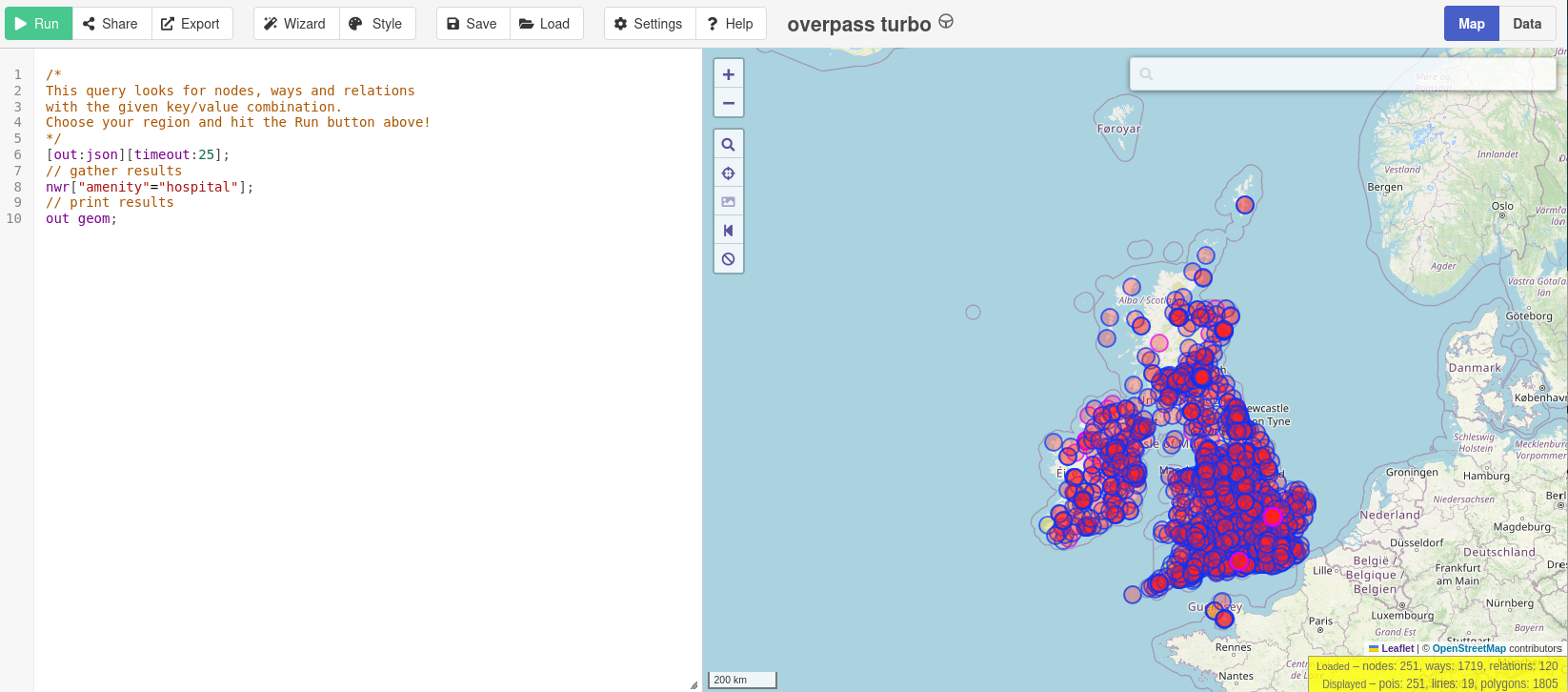
All the hospitals in the UK and Ireland, in about 10 seconds

Many people have noticed that publicly available Overpass servers have been suffering from overuse (a typical “tragedy of the commons”). OSM usage policies generally contain the line “OpenStreetMap (OSM) data is free for everyone to use. Our tile servers are not”. Unfortunately, there have been problems with overuse of the public Overpass servers, despite the usage policy. “Just blocking cloud providers” isn’t an option, because (see here - use the translate button below) lots of different sorts of IP addresses, including residential proxy addresses, are the problem.

People who want to use e.g. Overpass Turbo do have the option to point it at a different Overpass API instance. If you’re using Overpass Turbo and you get an error due to unavailability, likely that is because the Overpass API that it is using is overwhelmed. There are other public Overpass API instances, but they may be complete (in terms of geography, or history) or up to date.

See full entry

Location: Morton CP, North East Derbyshire, Derbyshire, East Midlands, England, United Kingdom
Posted by Marcelm005 on 16 February 2026 in English.

Lincolnshire ER OUT Routes

Hello! This is my first Diary Entry and I wanted to dedicate it to the Forum Post that I made about the UKs Only (I Believe) ER OUT routes in the case of any emergencies: mainly flooding in this case.

Overview

After major flooding in 2013 the council created the Lincolnshire ER Routes to enable people to quickly evacuate from the flood areas. Many of you make have driven past these and never even noticed! They are Red rectangular signs with the white text of ER out on them with a direction to follow. They are placed at every turn, so the evacuees follow the road ahead until a signs says otherwise.

Example Sign

https://www.geograph.org.uk/photo/6485754

Route End

The end of the route signifies that the evacuees are clear of the major flood risk and (presumably) there would be further guidance at the end of the route. The route end sign is the same as the direction signs however it features 5 black diagonal lines.

See full entry

Posted by Glassman on 13 February 2026 in English.

Purpose

Safe Routes to School is a program designed to help parents encourage their children to walk and bike to school safely, while promoting healthy engagement. In some locations, walking or biking to school is a child’s only means of getting to school. My goal is to help parents find the best routes to school and to assist them in working with local governments to improve safety. But we need more volunteers to help improve the data.

What We’re Building

  • Pedestrian and bike maps
  • Child-safe routing opetions
  • Walking and biking isochrone (walkshed) tools
  • Clear tutorials on how to map for pedestrians and cyclists
  • Tools SRTS groups can use in their local communities

Pedestrian and bike maps

Bike maps already exist. Not only does OSM offer two different map layers for cyclists, but there are several apps available. Pedestrian maps are a different story. While there are some pedestrian maps, such as the University of Washington’s Taskar Center for Accessible Technology’s AccessMap.app, they are limited. What is needed is a tool that parents can use to find a good walking route to school, as well as a tool that can help improve pedestrian mapping, much like OpenStreetMap US’s OpenTrailMap.us. The rendering should show pedestrian ways, crossings, accessibility features like tactile pads and kerb ramps.

Routing Engines

OSM has some great routing engines. The user interface will likely need to be improved so that features can be added to avoid. For example, railways may be dangerous for children to cross. By allowing the addition of features to be avoid, it’s possible to provide a safe route.

Walking and biking Isochrones (Walksheds)

See full entry

Location: Mount Vernon, Skagit County, Washington, 98273, United States