OpenStreetMap logo OpenStreetMap

Diary Entries in English

Recent diary entries

“I don’t know, can you?” is a joke of mediocre quality that is supposed to point out the difference between being able to do something and being allowed to do something. It is annoying to students all over because in everyday language, the word “can” gets used universally for both instances, and context clues make such comments seem pedantic. There is, however, a great place where pedantry is more than welcome: When maintaining a database, such as OpenStreetMap.

So, what’s the issue?

Access tags, including more granular specifications like motor_vehicle, bicycle or foot, specify whether someone is allowed to use a way, an amenity or whatever else. The wheelchair tag, on the other hand, specifies if it is possible to access or use the place, independent of whether it is allowed or not. Tag combinations like access=private and wheelchair=yes make perfect sense. Only a limited set of people are allowed to access a certain area, but when they are, they won’t be hindered by stairs, narrow paths or other issues that might make using a wheelchair difficult or impossible. Therefore, the only values that really make sense to use for the wheelchair tag are yes, no, limited, and designated. There are some other, user defined values that might make sense in a specific setting, but it does not make sense to apply the access tag logic to wheelchair tagging. Tag values like private, permissive and customers are an established way to convey access permission information, which is not what the wheelchair tag is.

To underline the difference between access tags and wheelchair tags, you can look at the iD editors input mask and see that they are completely different segments.

See full entry

First and foremost, I want to express my sincere gratitude to the ESA Hub organization for selecting me for this fellowship. It was an honor to be chosen, and I am thankful for the opportunity to learn and contribute. When I began the program, I must admit I lacked confidence in the validation process. While I understood the basics of OpenStreetMap (OSM), the responsibility of critiquing and correcting other mappers’ work felt daunting. I often second-guessed my ability to distinguish between a mapping error and a local anomaly. However, looking back now, this fellowship has been a deeply enriching and practical experience that completely transformed that hesitation into technical authority.

The program didn’t just teach me how to map; it provided a robust understanding of the OSM ecosystem and the HOT Tasking Manager workflows. Through hands-on practice, I moved from simple digitization to mastering advanced tools in JOSM, including plugins, filters, search functions, and custom map paint styles.

A significant part of my growth came from the specific tips and tricks shared by my peers and mentors. I am especially grateful to Brenda, who taught me the ingenious technique of turning satellite imagery to black and white to better distinguish building outlines from the surrounding terrain. Kingsley was also instrumental, introducing us to various keyboard shortcuts that have significantly enhanced the speed and precision of my mapping and validation. Furthermore, I learned about features I didn’t even know existed, such as a ford (a shallow place in a river allowing a crossing). Learning how to identify and tag such specific infrastructure made me realize that high-quality mapping is about more than just drawing shapes; it’s about capturing the reality of the ground to aid responders.

See full entry

My experience in the 2025 Validator Fellowship for Eastern and Southern Africa began on November 3rd, 2025, and concluded on January 7th, 2026, with all sessions held remotely. The fellowship consisted of 12 countries across Eastern and Southern Africa with 42 fellows. https://www.linkedin.com/pulse/introducing-2025-esa-validator-fellowship-z0nifutm_source=share&utm_medium=member_android&utm_campaign=share_via The program kicked off with an introduction to the Java OpenStreetMap Editor (JOSM), which was followed by an in-depth examination of its advanced features. This phase was particularly enlightening, as I discovered various validation tools that could significantly enhance the validation process. Before we could dive in the fellowship one had to complete a learning lesson. https://learning.hotosm.org/course/josm-skills-series

  1. Introduction JOSM

https://docs.google.com/presentation/d/1YjRJpVQZ9BnY7xmHOswq1DDvJq5b3Id2YsEs81QWVt0/edit?usp=sharing

-JOSM training i.e mapping and validation using JOSM; task #19146, #34096

Reflecting on my earlier encounters with validation, I remember a time when my approach was rather simplistic; I would merely activate the validation tool, rectify minor errors, and quickly mark tasks as validated. My lack of confidence or hesitance to trust the accuracy of my work often deterred me from pursuing further validation, leaving me unaware of the more effective techniques that were at my disposal.

See full entry

Posted by CrownE8 on 8 January 2026 in English. Last updated on 11 January 2026.

Flood Risk Map of Kenya using GIS

For the doc version: Kenya Flood Risk Map

Abstract

The Republic of Kenya has recently witnessed a series of devastating hydrometeorological events, transitioning from a severe multi-year drought to catastrophic, El Niño-enhanced flooding between 2024 and 2025. These events have underscored a critical need for high-resolution spatial data to inform disaster risk reduction and humanitarian response. This research, produced as a Legacy Project for the Humanitarian OpenStreetMap Team (HOT) Community Working Group (CWG) Mentorship 2025, presents a comprehensive national-scale flood risk assessment for Kenya. The study employs a Geographic Information System (GIS) and Multi-Criteria Decision Analysis (MCDA) framework to synthesize six influential factors: rainfall intensity, elevation, slope, Land Use/Land Cover (LULC), distance to water bodies, and distance to road networks. Utilizing a weighted overlay methodology, the study reclassifies these parameters based on their hydrological and anthropogenic influence to produce a final flood risk map categorized into five classes: Very High, High, Moderate, Low, and Very Low. The analysis reveals that high-risk zones are predominantly concentrated in low-lying river basins and informal urban settlements, where high rainfall accumulation coincides with poor drainage and high exposure. The findings provide a strategic foundation for the OpenStreetMap community and disaster management agencies to prioritize anticipatory actions, refine field data collection, and enhance the resilience of vulnerable populations.

Keywords

flood, Kenya, flood risk, mapping, GIS, Multi-Criteria Decision Analysis, OpenStreetMap

Introduction

The Kenyan Paradox: Historical Context and Emerging Flood Dynamics

See full entry

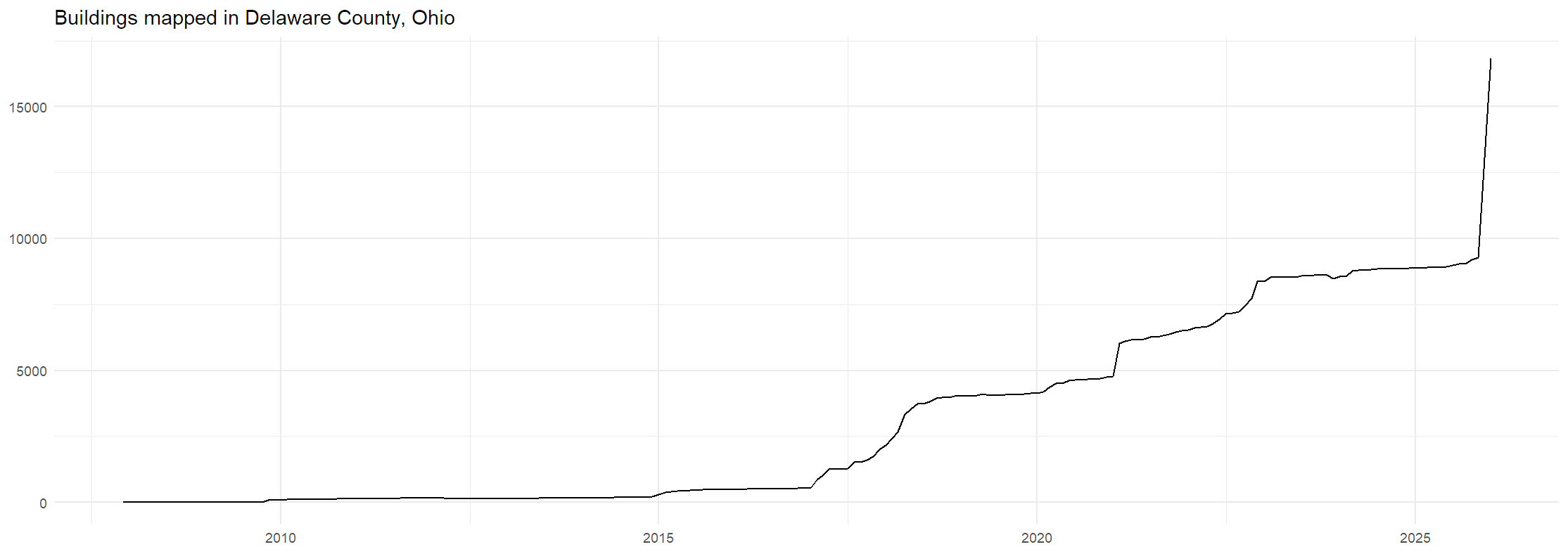
It’s a pretty nice jump.

A chart of buildings mapped in Delaware County, Ohio. It spikes from around 9000 to 17000 at the end of 2025.

On November 4th, 2025, I noticed that there were 9,566 buildings mapped in Delaware County, and told a few friends that I wanted to push it up to 10,000. Since then, I’ve been mapping buildings in Delaware County daily, averaging over 100 buildings per day. Once I got it past 10,000, my next goal was to get it so that building mapping in 2025 would outpace building construction in the county. Delaware County is a rapidly growing county, so I did some napkin math and guessed that there were about 1500 buildings added to the county in the year. By the end of the year, I had easily surpassed that goal, and was now working to push back that date of keeping pace with construction further and further. You can see that in this graph:

See full entry

Location: Berlin Township, Delaware County, Ohio, United States
Posted by DiegoMGom on 8 January 2026 in English.

​I moved to Caracaraí, Roraima, for work (the banking life) in the first half of 2025. It is a quiet town.

​By the end of the year, bothered by seeing that the city’s map on OpenStreetMap consisted merely of outdated streets, the City Hall, and the hospital, I decided to join OSM on December 29th.

​It is an Amazonian town of 20,000 inhabitants. The result of this first week is over 300 changesets trying to pull the city out of the void.

​All public amenities (that I can recall), such as schools, health centers, banks, etc., are mapped. And so far, half of the city’s buildings are already drawn (long live the Building Tool plugin!).

​Honestly, I don’t know who will care about detailed mapping here in the middle of nowhere, but I wanted to do it anyway.

Location: São José Operário, Caracaraí, Região Geográfica Imediata de Caracaraí, Região Geográfica Intermediária de Rorainópolis-Caracaraí, Roraima, North Region, 69360-000, Brazil
Posted by Evgeny Arbatov on 8 January 2026 in English.

I find that the width of OSM ways is a useful property for determining how good a pedestrian route is. However, it is often missing from OSM. As an experiment, I decided to use my running activities from Strava to estimate the width of a single OSM way that I use often. The specific way ID I used is in a relatively open area, meaning GNSS error is minimized. I also have collected over 100 traces of me running that single way ID over ~1.5 years. Given all this, how accurate can the estimate of the width be? I got the median width to be in the range of 11 meters. The actual width as measured with Google Maps satellite imagery is 13 meters. It’s close. I am happy with the result. I don’t have nearly as many traces for any other segment on the OSM map, so it’s a limited experiment, but the potential is promising. See the code on Github.

Location: Vinh Tuy Ward, Hà Nội, 11622, Vietnam
Posted by rphyrin on 8 January 2026 in English.

“From here, how do we get to Ragunan Zoo?”

Good question.

I paused. This wasn’t a matter of intuition; it was a routing problem.

I opened a navigation app, queried the destination, and switched the mode to public transport. The proposed solution was a multi-hop journey : take the blue commuter line to Manggarai, transfer to the red line toward Bogor, get off at Pasar Minggu, then continue with something called S15A.

S15A?

That identifier triggered a red flag. After a quick lookup, it turned out to be an angkot.

That immediately raised another question. Was there really no direct busway route to Ragunan? Not even a JakLingko alternative? Cost sensitivity was also a concern. There are plenty of public transportation modes in this city: MRT, LRT, Commuter Line, Transjakarta BRT, and Transjakarta non-BRT, but angkot and ride-hailing motorcycles are the two worst options, since they can end up being pricey due to the lack of government subsidization.

At that point, I decided to discard the initial navigation output entirely. Close the app. Start over with a more specialized tool.

I switched to the official Transjakarta application.

It refused to open and forced an update. Fine. Update first, then rerun the query.

Post-update, I defined the problem more explicitly. Assume the train leg was already completed. Starting point: Pasar Minggu Station. Destination: Ragunan. The goal was to find a replacement for the S15A angkot.

Search results came back clean. Instead of S15A, there was a JakLingko option: JAK47, Pasar Minggu–Ragunan. That was acceptable. Same endpoint, better integration.

Solution candidate number one locked in.


Then I expanded the scope. What if we removed the train entirely? What if the journey started directly from Bekasi using Transjakarta, via Vida to Cawang Sentral?

New query. New parameters. Starting point: Cawang Sentral. Destination: Ragunan.

See full entry

When I first started the ESA Validation Fellowship, I’ll admit I felt like a bit of an outsider. Even though I loved mapping, I often struggled with imposter syndrome, wondering if my skills actually measured up to the “expert” level. Looking back now, the growth I’ve experienced is incredible. I remember how intimidating JOSM used to feel with all its complex buttons and menus, but through this fellowship, it has become like a second language to me. I’ve moved past the basics and now feel completely at home using advanced tools to clean up and verify data. I learned new shortcuts and got to publicly map as others watched, proving to myself that I belong in this space.

Working alongside such talented people helped me realize that I really am an advanced mapper and a capable validator. Seeing my work hold up next to theirs finally silenced that voice in my head telling me I wasn’t good enough.

But as much as I’ve grown technically, the heart of this experience has been the people. Connecting with a global community of mappers who share the same passion for “mapping for change” has been the most rewarding part of the journey. The fellows were always helping each other out and in constant communication, a true community and something that happens only when people have common goals beyond borders. Together, we’ve been able to support humanitarian efforts and help communities become more resilient by making sure the maps they rely on are accurate and high-quality. Whether it’s a rural village or a growing city, I now understand that a precise map can be a lifeline.

This fellowship has changed how I see my work and myself. I’m walking away with new skills and if I could coin a phrase for the ESA Validation Fellowship, it would be : Certainly, what we do truly matters for the world.

Location: Kibauni ward, Mwala, Machakos County, Kenya

During the ESA HOTOSM Validation Fellowship, my journey began with the basics—learning how to install JOSM on my laptop and understanding its interface. From there, I learned how to install and use essential plugins such as the Building Tools plugin, Utils plugin, Mapathoner, and other supporting tools that greatly improved my workflow and actually made my validation easy. I also learned how to install and apply map paint styles, which helped me easily detect issues such as overlapping buildings and missing or incorrect tags, learnt how to work with different imagery such as bing, Esri and how to deal with the imagery offsets. These foundational steps laid the groundwork for my growth as a validator and deepened my understanding of data quality in OpenStreetMap. As the fellowship progressed, we moved into active validation, where I gradually became familiar with new JOSM shortcuts that made mapping and validation more efficient. Shortcuts such as B for drawing buildings, G for ungluing objects, and Ctrl + Shift + G for replacing the geometry significantly improved my speed and accuracy. As someone who had not done validation before, the daily practice sessions were extremely valuable. Validating tasks across different regions allowed me to learn by doing, and with each task, my confidence and skill level improved. This consistent hands-on practice reinforced the idea that practice truly makes perfect.

See full entry

My Growth Journey in the ESA validation Fellowship

When I was first selected for this fellowship, I felt a mix of excitement and nerves. My first major assignment was Hot Tasking Manager Project #16505, and I’ll be honest: it was a wake-up call. Initially, the tasks felt daunting. I quickly realized that while I knew how to map, I hadn’t yet mastered the advanced features required to validate data efficiently.

My workflow was slow, and I felt I was missing the technical “bridge” needed to ensure the high-quality data that a project of this scale demands. The breakthrough came through the mentorship of our facilitators. They introduced us to a suite of professional techniques and GIS tools that changed everything. Specifically, learning how to leverage advanced filters and JOSM shortcuts was a game-changer.

These weren’t just “tips” they were the keys to unlocking a much more efficient and precise validation process. By integrating these tools into my daily workflow, my technical hurdles disappeared. What once felt overwhelming now feels intuitive. This fellowship has done more than just teach me how to click buttons; it has provided me with:

  1. Technical Proficiency: A deep understanding of GIS features I previously overlooked.
  2. Confidence: The ability to validate complex data with precision.
  3. Professional Growth: A clearer perspective on the standards required in the GIS profession.

I am walking away from this experience with full confidence in my skills and a renewed passion for contributing high-quality data to the OpenStreetMap community

Posted by FRANCIS NDIRITU on 8 January 2026 in English. Last updated on 10 January 2026.

Introduction

The ESA Hub Fellowship was a deeply enriching and practical learning experience that significantly strengthened my skills in geospatial data production, validation, and humanitarian mapping. From the beginning, the fellowship introduced me to the mission of ESA Hub and the critical role that open geospatial data plays in disaster response, resilience building, and inclusive decision-making. I developed a strong understanding of the OpenStreetMap (OSM) ecosystem, humanitarian mapping principles, and the workflows of the HOT Tasking Manager, which laid a solid foundation for meaningful contributions to real-world projects.

Throughout the fellowship, I gained extensive hands-on experience in mapping and contributing to several humanitarian and disaster response projects. Using tools such as iD Editor and JOSM, I digitized key features including buildings, roads, waterways, and other critical infrastructure from high-resolution satellite imagery. I actively contributed to projects supporting humanitarian response in Sudan, Mapping for disaster resilience in Elgeyo Marakwet, and emergency response efforts for Hurricane Melissa in Jamaica, among many other projects. These contributions helped improve the availability and quality of geospatial data in under-mapped and disaster-affected regions, supporting responders and planners on the ground.

See full entry

As of December 13th, 2025, Swift and Portal interlockings have been renamed to “Old Swift” and “Old Portal”. Tracks and signals have also been renamed (2 turned into 22 and 3 turned into 33). I’ve already put in the edits.

Track diagram of Old Swift and Old Portal from NYW1-23-b

OSM: osm.org/#map=16/40.75308/-74.09527

Openrailwaymap: https://openrailwaymap.org/?style=standard&lat=40.7532&lon=-74.1037&zoom=15

NYW1-23-b: https://archive.org/details/AMTK-NEC-employee-timetable-supplemental-bulletin-20251213-NYW1-23-b

Current NEC ETT: Amtrak - Northeast Corridor Employee Timetable 2025-11-03, Special Instructions

As always, I put all bulletins and new employee timetables in this list on Archive.org

Amtrak’s FOIA office is now really fast. I can get bulletins the same day they are requested. Back in August they were much slower but now that I’m doing these every month they are on top of it.

Location: Kearny, Hudson County, New Jersey, 07032, United States

During the fellowship, I learned how to validate more effectively, especially by using filters, search functions, and setting up map paint styles. I became better at identifying issues, mapping across different countries, and validating data from other regions. This helped me understand mapping more deeply, including the different shapes of buildings across countries. I also gained a stronger grasp of quality standards and grew more comfortable using JOSM shortcuts. For example, while validating building footprints in Africa and later in Asia like Japan, North and South America, I noticed differences in building construction styles and settlement patterns. By applying filters and map paint styles, I was able to quickly identify inconsistencies such as overlapping polygons or missing tags and correct them. This experience not only improved my technical validation skills but also gave me a broader perspective on how mapping standards can be applied across diverse contexts.

During my validation mapping in Japan, I encountered a task where the same area had been mapped using two different imagery sources of Bing and Esri. This created alignment issues and inconsistencies in the data. Through the fellowship, I learned how to handle imagery offsets, switch between imagery layers and use search tools to trace a particular mapper’s edits. By applying these skills, I was able to identify the discrepancies, adjust the imagery and improve the overall quality of the map. This experience was particularly meaningful because it showed me how technical validation techniques like managing imagery sources and targeting specific edits can directly enhance data accuracy. It was a proud moment to see how my improved skills contributed to cleaner, more reliable mapping outputs.

See full entry

Posted by Norbert Dichter on 5 January 2026 in English. Last updated on 23 January 2026.

contributors

may I point you to our online mapathon?

Missing Maps London Online: Zoom

Our next Missing Maps mapathon will be Tuesday the 3rd of February and will take place online from 19:00 – 21:15 (Europe/London)

The early month meeting is focused on new mappers with breakout rooms for iD, JOSM and mappers who want to learn about validation usually with JOSM. Get your free ticket .

This Mapathon will take place online! If you wish to attend, then please get a ticket and details for joining will be shared with you.

This event is London based in name only! Since we have moved to virtual events we have been getting attendees from all over the world - we heartily welcome this!

Schedule 19:00: Introduction to Missing Maps and practical information

19:15: iD Training / JOSM Training / Validator Training

21:00: Closing discussion and potential talks

Posted by harisont on 3 January 2026 in English.

I’m finally back to mapping after an unplanned 4-month break.

I usually have a casual but relatively consistent approach to mapping: every time I have to go somewhere new and my exact destination isn’t in OSM, I add it once I arrive; if the opening times of a place I visit regularly change, I update them, and so on. As of late, though, this just hasn’t happened. Either map data has become good enough for my everyday needs in Gothenburg, Sweden or I’ve been paying less attention than usual. Probably a little bit of both.

Right now, on the other hand, I’m visiting my family in Agrigento, Italy, and mapping is the perfect holiday activity for me: it can (to some extent) be done without a computer, which is a nice change of pace, and it gives me an excuse to be outisde, enjoy the warm weather and take all the side streets I haven’t explored before or have forgotten about. Plus, there’s so much to do here compared to Gothenburg!

Today I simply went for a walk and answered a bunchn of quick questions on StreetComplete. In the next few days, I want to try something more systematic, like updating information about what’s happening inside each of the buildings of the main street: a lot has changed since I last came. I’m also pondering trying to get one or two family members involved; we’ll see.

Location: Bibirria, Agrigento, Sicily, 92100, Italy
Posted by fghj753 on 2 January 2026 in English. Last updated on 7 January 2026.

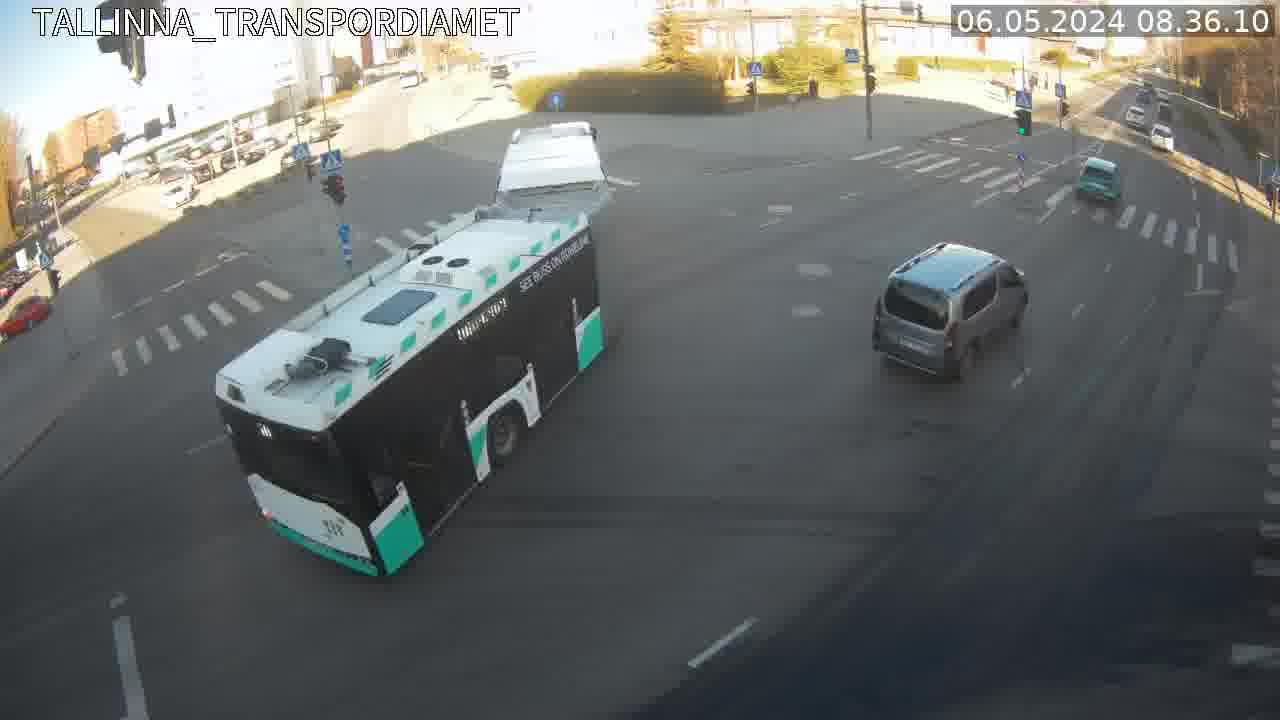
Started this year with a weekend mapping project: locate and map public traffic camera feeds from city’s website. Day 2 and I’m halfway done, about 130 out of ca 260 have live feed links now. Roughly 5 of them weren’t previously mapped at all.

Purpose of this diary entry is to save the checker scipt in publicly accessible place for unlikely reuse. Script scrapes all possible camera IDs and cross references them against already mapped feeds via overpass.

EDIT: Project was mostly completed as of 2026-01-02, changeset/176761784 outlines up to 10 missing cameras yet to be mapped.

sample img

Overpass query to get already mapped ones:

[out:json][timeout:25];
area(id:3600079510)->.searchArea;
node["contact:webcam"~ristm](area.searchArea);
out geom;

See full entry

Location: Pelguranna, Põhja-Tallinna linnaosa, Tallinn, Harju County, Estonia

Thumbnail of the video at commons

Link to the Time Lapse Video of Amaravati (2015-2025)

Time lapse video of OSM has been of interest to me for more than 10 years. I learned to use QGIS in 2015 and made a physical map of Andhra Pradesh in my first attempt. Learning QGIS with its myriad menus and concepts of GIS was daunting to venture further during my infrequent attempts. Finally I made my first time lapse video after 10 years. I found OSM contributor radiotrefoil's diary entry on the subject posted about an year back very helpful. Still I had to struggle to make a good video for OSM edits for Amaravati, the green field capital of bifurcated Andhra Pradesh, a province of India. This is an attempt to document my learnings and make it easier for others.

Choosing an area of interest and fetching data

See full entry

Location: Byrasandra, Bengaluru South City Corporation, Bengaluru, Bangalore South, Bengaluru Urban, Karnataka, India

Last weekend I traveled to the west coast of Java, specifically Anyer in Banten. The journey was done by train from Jakarta to Cilegon, followed by a local shared minivan taxi to Anyer.

Throughout the trip, I collected field observations using Sakumap. The result was a raw GeoJSON file containing coordinates and timestamps for each entry.

For observations I considered significant, I wrote a detailed report on the OSM Wiki. Less critical features such as restaurants, fuel stations, farms, and forest areas were added directly to OpenStreetMap by importing the Sakumap GeoJSON into iD Editor or JOSM, without additional documentation on the wiki, as the overhead did not seem justified.

See full entry