OpenStreetMap logo OpenStreetMap

Diary Entries in English

Recent diary entries

This is really just down the road from the last bit. I decided to finally try out JOSM for editing. Everyone’s doing it? It was initially harder to do the simple things. Frustratingly, it wouldn’t let me start a new line rather than adding to an old one as I started adding the trail at the end of the stub of road at the Rio Lado trailhead. This trail was supposed to be a circle on the end of about 2 miles of trail, but I found about 2 miles of trail and, unrelated to the location of the circle, some other random trails. There were even equestrians on one of them. Back to the mapping, I found that joining these various lines was difficult and I even managed to upload one without any tags at all. I went back and fixed things with iD, which isn’t appropriate. It does say that there’s a steep learning curve.

Then I moved on to the Calico National Recreation Trail. This is a motorcycle trail, but it actually does see plenty of hikers and mountain bikers, too. I was aiming at a bunch of peak bagging along its spine, but apparently was too rusty in my packing of my overnight backpack. I tagged Elliot Peak and returned. Then I took a different route up to the mountain spine to tag a few more peaks in an overnight. Sockrider first and the namesake Calico last.

See full entry

Location: Dolores County, Colorado, United States
Posted by SomeoneElse on 25 January 2023 in English. Last updated on 30 March 2023.

This isn’t directly related to OSM, but many times in “software” or “development” OSM channels someone has asked “how do I do X … on Windows 10?”.

The reason that’s often a question is that, for historical reasons, much of the OSM software used to do things has been developed on Linux. That’s great for people working on Linux themselves, and the Apple Macintosh users can normally jury-rig something to run that software too.

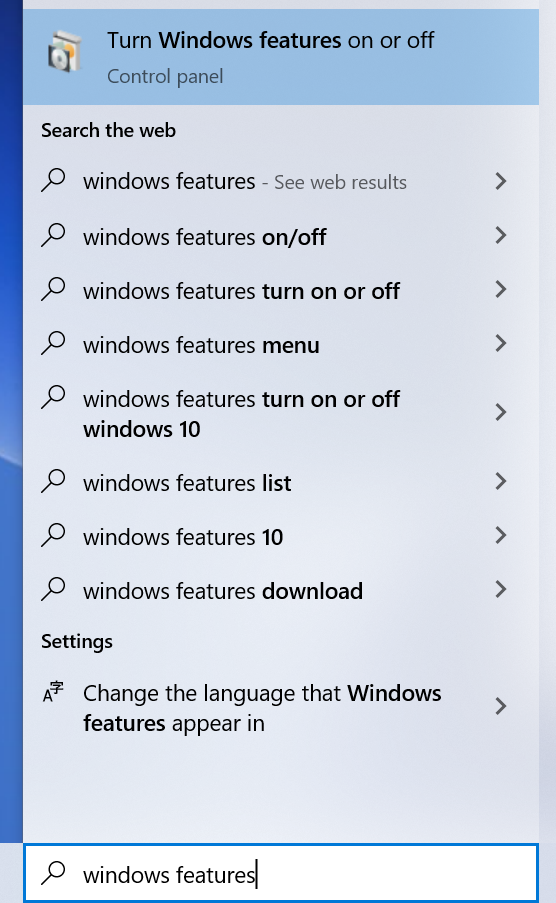
Windows users can do the same too, by installing “Windows Subsystem for Linux”. Within Windows, search for “Windows Features”:

In Windows Features, tick the box for WSL and click OK:

See full entry

Querying elements from osm and doing practical things with them is really a useful and fun way of code “hacking” for me. In this case, I wanted to show farmers markets with a reactive map like leaflet like I’ve done before in my journal entries. In this case, I wanted to make it easy to browse the times, seasons, and contact info for farmers markets in the Anchorage, Alaska area. I think with some refinement this map could be useful to sellers and buyers to determine which farmers markets they can fit into their schedules.

See full entry

Location: Campbell, Anchorage, Alaska, 99518, United States

GIS data for listed buildings, scheduled monuments (e.g. interesting tumuli) and more can be downloaded from https://historicengland.org.uk/listing/the-list/open-data-hub/, and here are some observations based on my experiments with geoJSON and shapefiles.

The data is under the Open Government Licence so OK for editing OSM.

The download can be kept to a manageable size by enabling “Filter as map moves” in the filter menu (funnel symbol) and then “Toggle filters” when selecting the download.

Vespucci can display a geoJSON layer, show object attributes, and even create preliminary OSM objects from them. But it didn’t work here. I discovered that the downloaded geoJSON uses EPSG:3857 (projected coordinates) whereas the geoJSON standard is EPSG:4326 (latitude and longitude).

An easy way to do the conversion was to go to https://mapshaper.org, “upload” the file (actually it’s processed on the client side), open the console and enter:

-proj from=EPSG:3857 crs=EPSG:4326

and then export.

The resulting geoJSON works well in Vespucci. You can either “Add GeoJSON layer” from the layer menu, or select it in a file manager and open with Vespucci. I could do the whole process above on a modest android tablet.

OSM tags worth thinking about include:

  • heritage = 2
  • heritage:operator = Historic England
  • ref:GB:nhle =
  • listed_status =
  • wikidata =

Note that I’m not suggesting adding anything to the map that can’t be located with a ground survey, and certainly not blindly copying polygons (aside from considerations of verifiable ground truth, these may include a protective buffer around the feature).

See full entry

A JOSM screenshot of the road network for Rifle Colorado

The problem with remote TIGER review (and solution!)

I recently did a major road alignment update for Rifle, Colorado. With JOSM and the to-do plugin, it only took a few hours and the road data is much improved. Doing the geometry check was time consuming but easy. Checking that the names are all correct? Isn’t that impossible from my desk? Thankfully no!

There are two kinds of name checking that I like to do. The first is to check that they are “sensible”, meaning that they have been expanded and there’s no obvious vandalism. The next is that they are “correct”. Because most road names originated from the TIGER import we shouldn’t use it to cross check for “correctness”. The good news is that the National Address Database has data for huge chunks of the country and provides us with another source to get a sense of how good the road network is named.

The workflow

See full entry

It is very interesting to see the variations in data quality errors in OpenStreetMap per country (Asia Pacific Hub priority countries).

We broke down the type of error per country from OSMOSE and found out some interesting trends.

Like for example, it is noticeable that there are alot of overlapping building errors (~437,652) accounting for the 2nd most common mistake.

As map contributors, we should also put into highest standard the edits we add to OSM. Maybe in the next few months, we can host to bring these errors down.

Furthermore, some types of errors are generally acceptable like “building over agricultural landuse” and local language. Nonetheless, Thankful for Osmose for this powerful tool.

Link to Database

Location: North Fairview, 5th District, Quezon City, Eastern Manila District, Metro Manila, 1121, Philippines
Posted by bradrh on 24 January 2023 in English.

I’ve been updating OSM roads and trails based on the US Forest Service Motor Vehicle Use Maps (MVUM). The USFS MVUM is “the legal instrument that shows where people are allowed to drive”. There are many roads shown in OSM that are not open to motor vehicles, but not properly tagged. There are also few roads and quite a few moto trails missing.

If there’s a road that is not open I just add motor_vehicle=no. It’s possible that it could be access=no, but often it’s still open to bikes & almost always still open to foot or horse traffic. Since all I really know from the MVUM is motor vehicle access that’s all I usually add. I’ll update the ref tag if it needs it.

The data sources I’ve found for this are a nationwide SHP file and geopdf’s for individual forests.

The shapefiles are available here: https://data.fs.usda.gov/geodata/edw/datasets.php?xmlKeyword=mvum Since that’s the whole country, I use ogr2ogr -clipsrc bounds outfile infile [note the backwards order for the files] & clip to a manageable size. The whole state of Colorado seems to be a manageable size. I don’t directly import anything from the shp file, but If I see a fairly long trail or road missing I’ll copy and paste into a josm layer.

A web search of the forest name & MVUM will yield a page like this: https://www.fs.usda.gov/detail/psicc/maps-pubs/?cid=stelprdb5177824 (I just noticed that page has SHP files too.) I convert these to tif & load the image into JOSM. gdal_translate -co TFW=YES file.pdf file.tif JOSM is really sluggish with this so if someone has a better way I’m all ears.

My 1st step is usually to load the geopdf into Qmapshack overlayed with my custom OSM map built with mkgmap. I can fairly quickly see differences this way, easier than in JOSM. Once I know what part of the map needs work I load JOSM with the tiff image and make the OSM changes needed. I’m starting to use the SHP file more & may use the tif less.

See full entry

Bing StreetSide is alternative to Google Street View which can be used for OpenStreetMap mapping. There is a MicrosoftStreetside plugin for JOSM but it doesn’t work for me due to dependencies of JavaFX/360 views.

I have managed to use it via Utilsplugin2.

  1. Edit => Preferences (F12) => Utilsplugin2 settings
  2. Add new row with name Bing StreetSide and url https://www.bing.com/maps?cp={#lat}%7E{#lon}&lvl=19.0&style=x.
    In the case of issues one can edit customurl.txt. For Linux/Flatpak it’s located at ~/.var/app/org.openstreetmap.josm/data/JOSM/plugins/utilsplugin2/customurl.txt.
  3. Choose Bing StreetSide in Data => Select custom URL
  4. Now you can see Bing StreetSide via Data => Open custom URL (Shift+H)

If StreetSide is available at given location it will be displayed. Otherwise map is shown with streets colored blue where it’s available.

Posted by watmildon on 22 January 2023 in English. Last updated on 5 February 2023.

A computer screenshot of JOSM showing OSM building outlines and NAD address points shown for several houses with objects needing address data highlighted in red

What now?

In my previous diary entry I demonstrated using a Tableau visualization to find areas of the United States that could benefit from additional address data. If you find some place you’d like to work on, now what?

Getting set up (social)

OSM is a community project. It’s important to make sure mappers know what’s going and it’s always a good thing to give a heads up about plans for any big data changes in an area. Because this dataset is US centric I’ve been using the OSMUS Slack to keep people up to data about what’s happening. Each state has a “local” channel where you can get feedback and find folks to work with.

Always remember, not everything in the dataset needs to be added to OSM. It doesn’t cost anything to leave stuff out but can be quite time consuming to clean up if not done well.

Getting set up (tools)

Here’s what you’re going to need

See full entry

I had been in this area, then run to lower elevations for a storm, then back for some trails I still wanted to do.

Work for mapping began with Hope Lake, where someone had managed to number the trail, but not name it. After the lake, they’d just marked it with a fixme. Yes, it’s the same trail. Then I got to playing with things over the hill and there was more of this very minimal editing to improve. Then I ran into the Colorado Trail. Um. The Colorado Trail is a mess, frankly. Someone decided it should all be named “Colorado Trail (Segment #)”. This is an area where the trail runs along older named trails. The Forest Service went hyphenating the name onto the old name on their maps to keep them both on the map, but it is two different names. Someone had copied it over, including keeping the Colorado Trail on a differently named trail after the Colorado had left it. And then I started running into the segment numbers. Why? Why why why? That’s a whole project in itself.

So I quit that and moved on. I thought about doing the Sheep Mountain trail, which may be informal but is well maintained including an astonishing amount of logging out the old road it follows. Unfortunately, I only joined it halfway along on my way down. I didn’t like the look of the mountain where it goes and took on some easy, if steep, mountain instead. The log at the top indicates Teluride is up here all the time in the summer. I dithered and ultimately did add what I could. There are complete tracks on Peakbagger, so I could potentially add all of it depending on the license there.

See full entry

Location: San Miguel County, Colorado, United States
Posted by mvexel on 21 January 2023 in English.

This is a crosspost from my blog.

I’ve been testing the latest alpha version of the RapiD editor. RapiD is a web-based editing environment for OpenStreetMap that incorporates special layers with map features from other sources you can easily copy over to OSM. Examples include Microsoft’s building footprint data, missing roads generated with machine learning, and open data from government GIS sources.

Because RapiD is not included in the dropdown menu where you can select an editor on the OpenStreetMap website, I created a few bookmarklets1 for myself that I hope come in handy for mappers who want to have quick access to RapiD. They are self-contained and don’t read any content from your browser other than the current URL. If you’re not currently on openstreetmap.org or actively editing in the default OSM web editor iD, the bookmarklets will simply do nothing at all.

I tested these bookmarklets in Firefox and Chrome. You can find the source code here. When a new version of RapiD comes out, I’ll do my best to update the bookmarklets.

  1. The bookmarklets are on a separate page, because this blog’s markdown parser has trouble with the javascript: links. 

I found an old mining road that’s being maintained as a trail while staying by the river, so I added that. Then I got all fiddly and added a bunch of driveways. I wish I’d taken a picture of the map BLM had on their information board at Caddis Flat Campground (added details about it) because that map had a more official trail a little further east, also leading to a mine.

Location: San Miguel County, Colorado, United States

I started off my excursions around Blue Lakes with explorations of what I suspected was an old mining road. It was clear it was from logging. It was also clear that although a few trees have come down, it’s being kept open for hiking. It certainly isn’t usable (or legal) for driving. I decided to add the system as a path. It’s outside the wilderness, so the bikes can use it too. Apparently I was almost to the end when I turned back.

I was surprised to see that the ATV trail hasn’t been mapped. I marked the bridge and got it a little further, but then it gets too close to the creek and the creek is often not in the right place and I got frustrated. It goes through to somewhere and connects to another trail that climbs soon after where I stopped. (That trail is also missing.)

Location: Ouray County, Colorado, United States

So I attacked the dreaded West Elk. I think I started faltering on marking trail visibility near the end, but I started off well on Coal Mesa. I marked the camp good camps. I didn’t mark the spring I found to camp that first night… Maybe I have to go back. I made sure the trail was really clear around the peak, which has some problems. Stay low, whatever you do! It doesn’t look like much, but it goes very directly for the last 40 feet.

I didn’t add any of the trails I didn’t see anything at all of, and there’s a bunch. I did make sure everything off the side of North Baldy was marked. I managed to connect it to the trail even. Put down some cairns. It looks like it probably connects to Beaver Creek far down rather than going around the top of the bowl that Beaver Creek occupies.

All that informal stuff around West Elk Peak is now marked as such and has difficulty and visibility. There’s some trail visible down low on the evil T4 track going north from the peak, so I decided not to give it visibility=no.

Added some more camps I’d noted along the way. It’s good info, it is. I couldn’t note the no camping. There’s quite a few lakes that have no camping allowed within a quarter mile, so it is something that is needed. Google was uniquely unhelpful deciding I was on about subjects that have nothing to do with camping.

I marked some of the trail I found as I left Sheep Lake (and the nice camp along it!). I adjusted the junctions into something sensible that at least resembles what’s on the ground. I marked the south route down as visibility=no and added a note that I didn’t see any evidence it was ever there. I did find a track on the other side of the lake that wound around to the trail which included one blaze and a cut log. Nothing at all for the larger trail.

See full entry

Location: Gunnison County, Colorado, United States

Before going to Dillon Pinnacles, I noticed one map shows the trail to the pinnacles (and a couple interpretive signs) while another shows a trail up Dillon Gulch. This trail predates the reservoir and just goes to a spring. (The map actually showed it just randomly starting at the water with no entry other than boat.) I found it signed and it is easy to trace all the way to the spring and no further as advertised. The sign was specifically giving the dates. The land between the NPS and USDA is state wildlife, I believe, and they don’t want you up there for the big game migration in late winter, early spring. And now you know from the map.

Location: Gunnison County, Colorado, United States

I hiked Ptarmigan Lake and pushed on to the nearby peak. The last part is cross country, but the since I did it by the road, I did almost all the trail. Since the road crosses the trail, I decided it would be good if it was mapped properly. The trail was marked T4. There is absolutely no point at which you need to get your hands out of your pockets for this trail. T3 is really pushing it. Everyone travels the trail next to the lake, which has huge steps and leaves the lake on a very steep slope. I noticed the higher trail (which one person was taking, so not quite everyone) that turns out to be very smooth and obviously the built one. I marked it, but only as old trail. Correctly, it should be marked as the actual trail.

There’s rumors there’s work happening on Lost Lake, so I didn’t touch that.

The picnic area over Cottonwood Pass has a well used trail to the edge of the wilderness. The old picnic area had a much larger trail that I found as I hiked about. There was a break and then obvious trail again as I hiked out to a big shoulder. I decided against adding this. My track is public for folks to see, though.

This hike up Turner Peak started along an informal trail that someone put up roughly. Might as well get it better. I didn’t bother with the rest of the track, but some of that on to the peak was very trail-like. Not so much my travel over to South Texas where the CDT travels now. I left it alone.

Location: Chaffee County, Colorado, United States
Posted by bryceco on 20 January 2023 in English. Last updated on 29 January 2023.

Harry Woods posted a diary entry a couple days ago about his attempt at editing every day for a year, and I started wondering what the records are for the most number of consecutive days that people have contributed to the map. I already had some code lying around for parsing the changeset history file so it was pretty easy to mine that data. It turns out there are some super dedicated mappers! Here are all the people who have editing for at least 1000 consecutive days:

Edit: Fix an error in table calculation (Thanks Aurimas Fišeras!)

See full entry